Kubernetes launcher
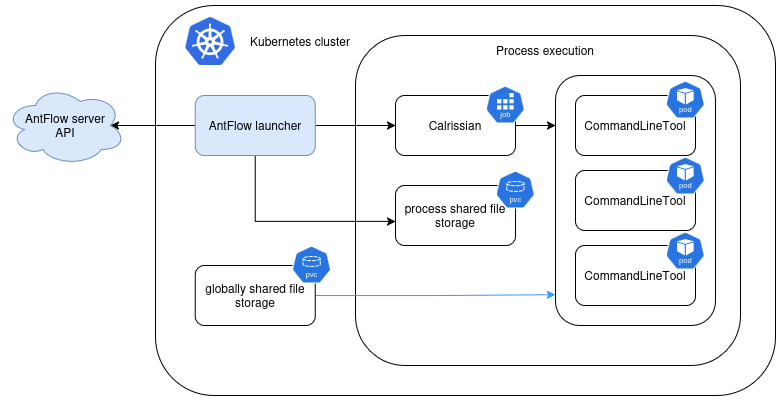
The k8s runner starts a Kubernetes Job running
Calrissian. Calrissian schedules CWL
workflow steps as pods in the execution namespace.
The official way to install the Kubernetes launcher is with the AntFlow Helm chart.
Requirements
- A Kubernetes cluster, Helm, and permission to install the chart's resources. See the chart prerequisites for supported versions.
- Shared writable storage supporting
ReadWriteManyfor the launcher, Calrissian, and workflow pods. - Network access to the Server API, workflow container registries, input data, and publication destinations.
Install with Helm
The standard chart deployment enables the Kubernetes launcher, provisions its working PVC and service accounts, and supplies its registration token. Follow Installation with Helm for the complete deployment.
For an additional launcher, register it with the central server and deploy the chart in the execution cluster using the launcher-only topology. Supply the Server API URL and an existing Kubernetes Secret containing the registration token, as described there.
Configuration
Configure the launcher through Helm values. The chart generates its runtime configuration and uses in-cluster service account credentials; no separate TOML file or kubeconfig is needed. Refer to the chart's launcher reference for storage, resources, concurrency, scheduling, image pull Secrets, and runner settings.
Before overriding the launcher's image tag, choose a compatible version.
Storage
Set launcher.persistence.storageClass to a storage class that supports RWX.
The launcher working PVC holds per-job inputs, outputs, cache, and logs.
Calrissian mounts the job's subdirectory at /calrissian. With dynamic job PVCs
enabled, the launcher creates an additional claim for each execution.
Dataset mounts are not automatically read-only
Existing dataset claims can be mounted in workflow pods. Set dataset permissions according to your access policy.
Ensure the launcher, Calrissian, and workflow-image users can access the shared
files. The standard launcher and generated Calrissian coordinator use UID/GID
1001:1001. Your storage driver must support the required ownership and permissions.
Resources and scheduling
Distinguish the launcher's own resources, the Calrissian coordinator's container resources, and Calrissian's workflow resource budget. Launcher concurrency controls how many workflows run at once; account for their combined resource and storage needs. Use the chart reference to configure these limits and node selection.
Environment variables for workflow pods
Use launcher.settings.runner.k8s.secret_for_env and
launcher.settings.runner.k8s.configmap_for_env in Helm values to reference
Secrets and ConfigMaps in the execution namespace. Their keys become environment
variable names in workflow step pods. Keep credentials in Secrets rather than ConfigMaps.
Monitor execution
The launcher creates a Calrissian Job, monitors its status, reads output metadata from shared storage, and reports the result to the server. Calrissian creates the individual workflow pods.
Use the execution namespace configured for your launcher (antflow for the
default Helm deployment). List its resources, then enter a Calrissian Job name
and workflow Pod name from that list. These prompts use Bash:
read -r -p "Launcher execution namespace: " EXECUTION_NAMESPACE
kubectl get jobs,pods,pvc --namespace "$EXECUTION_NAMESPACE"
read -r -p "Calrissian Job name from the list: " CALRISSIAN_JOB
kubectl logs --namespace "$EXECUTION_NAMESPACE" "job/$CALRISSIAN_JOB"
read -r -p "Workflow Pod name from the list: " WORKFLOW_POD
kubectl describe pod --namespace "$EXECUTION_NAMESPACE" "$WORKFLOW_POD"
Common causes of pending or failed execution include:
- unbound PVCs or a storage class without RWX support;
- insufficient resources or node selectors that match no nodes;
- missing Secret/ConfigMap references or private-image pull credentials;
- insufficient service account permissions;
- working-volume ownership or certificate trust.
Successful working files are normally cleaned up. Failed state can be retained for retry.
Retain working files for inspection
Set launcher.settings.keep_working_folder=true to retain working files.
This also delays dynamic-claim cleanup; plan storage retention accordingly.
What's next
- Run a workflow: select this launcher and verify a complete job, including logs and results.
- Execution policy: match workflow requirements to the launcher's advertised capabilities.
- If execution pods use company-issued certificates or TLS inspection, configure company CA trust.