Local launcher
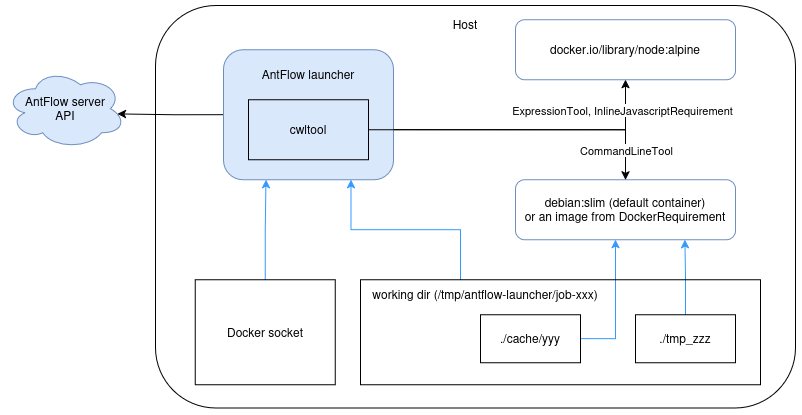
The local runner executes CWL workflows with AntFlow's cwltool distribution,
antflow-cwltool. The launcher runs on one host, and containerized workflow
tools use that host's Docker or rootless Podman runtime through its mounted
API socket.
Requirements
- A launcher registered with AntFlow Server.
- A Linux host with Docker, or rootless Podman with its API socket enabled.
- Network access to the Server API, workflow container registries, input data, and publication destinations.
- A writable working directory with enough space for inputs, temporary files, and outputs.
The launcher image includes the Docker CLI, not a container daemon. Mount the host runtime socket so the launcher can start workflow containers.
Runtime socket access
Access to the socket gives the launcher control over containers available to that host user. Use a dedicated host or account and trusted workflows and inputs.
Configure the launcher
Follow Access the API to
identify the Server API base URL. Use the instance where you registered this
launcher. The dotenv block below is a template: replace APP_API__URL with that
full literal URL and APP_TOKEN with the issued launcher token, not a user API
credential. Do not put $API_URL in the file expecting it to expand.
Create a .env file in your launch directory and restrict access to it:
Choose supported flavors that match the jobs assigned to this launcher. See the launcher configuration reference for concurrency and logging controls.
Select a compatible launcher version, then enter its image tag:
Run with Docker
WORKDIR=/tmp/antflow-launcher
mkdir -p "$WORKDIR"

docker run --rm --name antflow-launcher \
  --user "$(id -u):$(id -g)" \
  --group-add "$(stat -c '%g' /var/run/docker.sock)" \
  --env-file "$PWD/.env" \
  --env DOCKER_HOST=unix:///var/run/docker.sock \
  --env APP_WORKING_DIR="$WORKDIR" \
  --volume /var/run/docker.sock:/var/run/docker.sock \
  --volume "$WORKDIR:$WORKDIR" \
  registry.gitlab.com/csgroup-oss/antflow/antflow-launcher:$LAUNCHER_VERSION
The host user must be able to write to the working directory and access the
Docker socket. The additional group grants the container process access to the
socket. Stop the foreground launcher with Ctrl+C.
Mount the working directory at the same path
The directory must have the same absolute path on the host and in the launcher container. The host daemon resolves the bind-mount sources created by cwltool. Mounting it at a different container path prevents workflow containers from accessing their files.
Run with rootless Podman
Enable the user's API socket:
If the socket must remain available after logout, enable lingering according to your host's policy:
Use the same .env file and same-path working directory:
WORKDIR=/tmp/antflow-launcher
mkdir -p "$WORKDIR"

podman run --rm --name antflow-launcher \
  --user 0:0 \
  --env-file "$PWD/.env" \
  --env DOCKER_HOST=unix:///var/run/docker.sock \
  --env APP_WORKING_DIR="$WORKDIR" \
  --volume "/run/user/$(id -u)/podman/podman.sock:/var/run/docker.sock" \
  --volume "$WORKDIR:$WORKDIR" \
  registry.gitlab.com/csgroup-oss/antflow/antflow-launcher:$LAUNCHER_VERSION
Container user 0:0 maps to the invoking host user under rootless Podman. Adjust
the socket path if your runtime directory differs. If SELinux blocks socket
access, the upstream launcher guide uses --security-opt label=disable; assess
that relaxation against your host's security policy.
Use Podman's Docker-compatible API
Do not enable cwltool's native --podman option for this socket-based setup.
Customize runtime settings
To use a custom settings file, mount it read-only and set
SETTINGS_FILES_FOR_DYNACONF to its absolute path inside the launcher container.
Use [default] tables as described in the launcher configuration reference.
Useful local-runner settings include:
| Setting | Purpose |
|---|---|
default_container |
Fallback image for command-line tools without an applicable CWL DockerRequirement. |
javascript_eval_timeout |
Timeout in seconds for JavaScript expression evaluation. |
cwltool_extra_args |
Additional arguments passed to antflow-cwltool; see the cwltool command-line options. |
keep_working_folder |
Retain job working files after normal cleanup. |
Set APP_LOG_DIR and mount a writable directory at that path if you need launcher
service log files. Without a log directory, service logs go to stderr.
For job logs, see Job log archiving.
CWL command-line options
Supply cwltool_extra_args as a list of individual argument tokens, not a shell command string. Use options supported by your installed antflow-cwltool version; the upstream CLI reference describes standard cwltool options.
The local launcher already supplies these options:
| Option | Launcher configuration or value | When supplied |
|---|---|---|
--preserve-environment |
One occurrence per variable returned by the launcher's execution environment. | When execution environment variables are present. |
--job-id |
AntFlow job ID. | When a webhook URL is configured. |
--webhook-url |
Launcher webhook URL. | When a webhook URL is configured. |
--cachedir |
cache directory under the per-job working directory. |
When enable_retry=true. |
--eval-timeout |
javascript_eval_timeout, in seconds. |
When the setting has a nonzero value. |
--default-container |
default_container image. |
When the setting is nonempty. |
--tmpdir-prefix |
tmp_ prefix under the per-job working directory. |
When DOCKER_HOST is nonempty, as in the Docker and Podman examples above. |
--outdir |
outputs directory under the per-job working directory. |
Always. |
--enable-ext |
Enables cwltool extensions. | Always. |
--job-id and --webhook-url are AntFlow-specific extensions, not upstream
cwltool options. The launcher also supplies the CWL document with its workflow
ID fragment and the job's inputs file as positional arguments.
Use the dedicated launcher settings for options it already manages rather than
duplicating them in cwltool_extra_args. Additional arguments are inserted before
the CWL document and inputs file.
How execution works
- The launcher fetches a job, its CWL package, and inputs from the server.
- It stages per-job files in the shared working directory and starts
antflow-cwltool. - cwltool orchestrates the workflow and starts a container for each containerized
CommandLineTool, using its declared image or the fallback image. - The launcher monitors execution and reports status and results to the server.
JavaScript runs in its own container
The AntFlow launcher image does not include Node.js. All CWL JavaScript
evaluations, including ExpressionTool steps, run in a dedicated
docker.io/library/node:alpine container through the host runtime socket,
not in the launcher or the fallback tool image.
Troubleshooting
- Runtime socket permission denied: check the socket path, host access, and container UID/GID or socket group.
- Missing inputs or bind-mount errors: verify that the host and launcher use exactly the same working-directory path.
- Working-directory permission denied: create the host directory before starting the launcher and make it writable by the invoking user.
- Images or data cannot be fetched: check registry access, network routing, and company CA trust.
What's next
- Run a workflow: select this launcher and verify its logs and results.
- Keep workflow results on your machine: a complete example without result or job-log uploads.
- Launcher capabilities: match this launcher's advertised flavors to workflow requirements.